Jupiter Ultra Private Limit Orders
A new generation of limit orders that hides the trigger price on-chain. Here's how CLOBr surfaces them anyway so you don't trade blind into invisible walls.
The 30-second version
Jupiter Ultra is a newer way to place limit orders on Solana that deliberately hides the trigger price on-chain. Traders using older tools see nothing. The order looks like an anonymous token deposit. CLOBr detects these orders the moment they're set up and surfaces them on the Limit Orders tab with a padlock badge, a TBD price, and a roll-up of total looming buy and sell dollars so you can see the magnitude of hidden pressure on a token. The moment a partial fill reveals the trigger price, the order joins the support and resistance bars on your chart automatically.
Limit orders, briefly
A limit order is a standing instruction: "buy this token when it drops to X" or "sell when it hits Y". The order sits unfilled until the market crosses your price, then executes automatically. Traders use them to set entries, take profits, or stop losses without watching the screen.
On Solana, most limit orders historically lived on Jupiter's on-chain limit order program. Anyone scanning that program could read every order: who placed it, the side, the size, and the exact trigger price. That transparency is what CLOBr's liquidity charts have always shown: those tall walls of pending buys and sells you see on a token's detail page.
What makes Jupiter Ultra different
Jupiter Ultra was built for traders who don't want their hand shown. Instead of writing the order to the public limit order program, the user's funds get parked in a fresh per-order wallet that Jupiter's keeper has spend authority over. The target price never touches the blockchain. It lives in Jupiter's off-chain database.
Result: a competitor scanning Solana sees only a token transfer into an anonymous wallet. They have no idea it's a limit order, no idea what direction, no idea where the trigger sits. This is powerful for the trader placing the order, and a problem for everyone else trying to read the order book, because that invisible wall can absorb a rally or break a support level without warning.
How CLOBr surfaces them
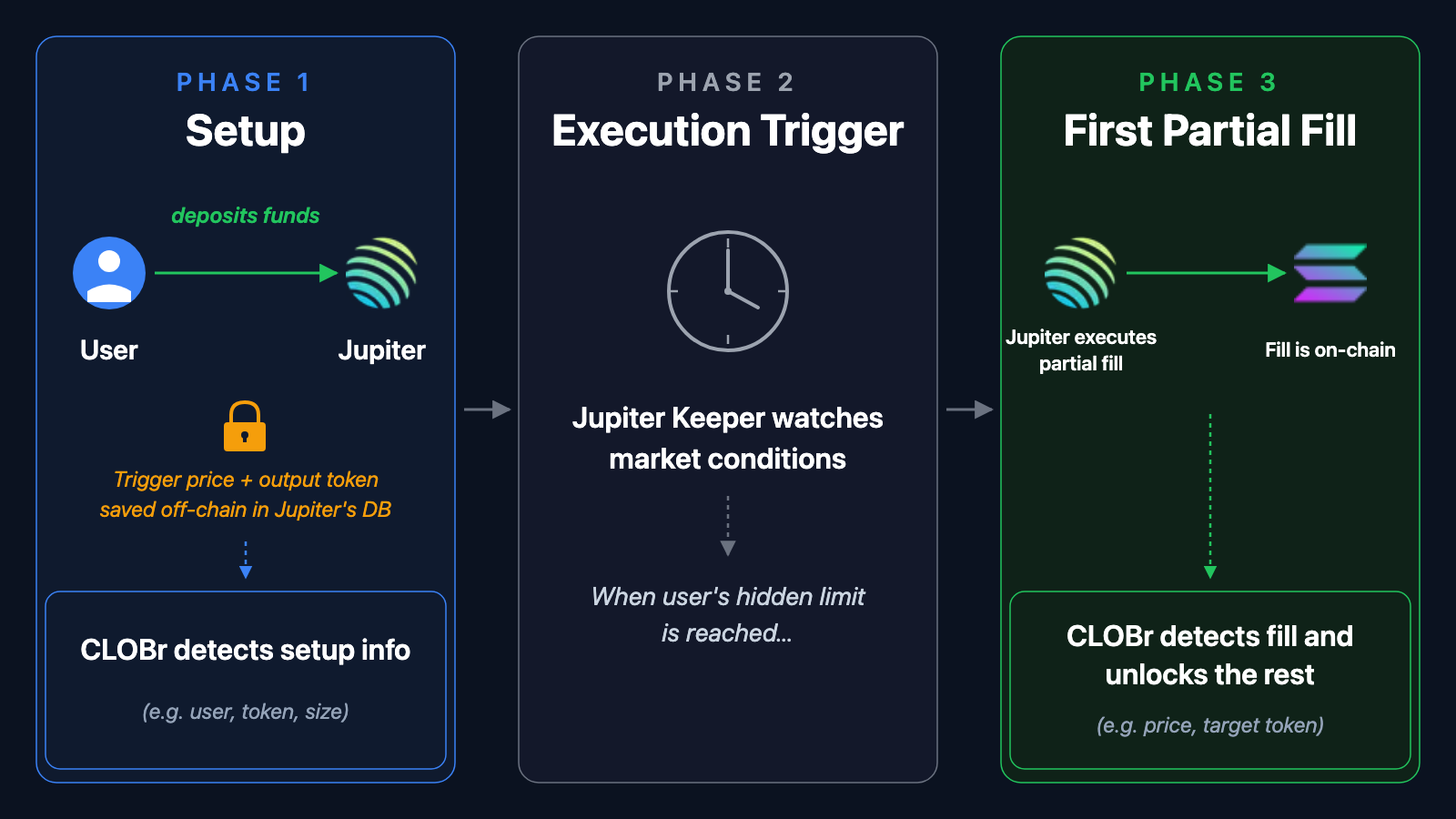
We monitor the on-chain programs Jupiter uses to set up Ultra orders. The moment one is created, we capture the trader, the proxy wallet holding the deposit, the input token, the intended output token, and the dollar amount committed. The trigger price isn't on-chain so we can't know it yet. That's why you see the TBD badge.
When a Jupiter keeper fills the order (in whole or in part), the fill is on-chain. If it's a partial fill, the effective rate of that chunk is the trader's hidden limit price. We pick that up instantly, stamp the price onto the order, and surface it in the support and resistance bars on the token page. From that moment on, the order behaves like any other limit order in CLOBr.
What we know vs. what stays hidden
| We know | Hidden until fill |
|---|---|
| Who placed it (maker wallet) | The trigger price (lives off-chain) |
| Direction: buy or sell | For sells, the exact token they want in return |
| Dollar value committed (in real time) | Whether the price will ever hit |
| When it was set up | The trader's intended fill schedule |
| When (and if) it's cancelled or filled |
Where they show up in CLOBr
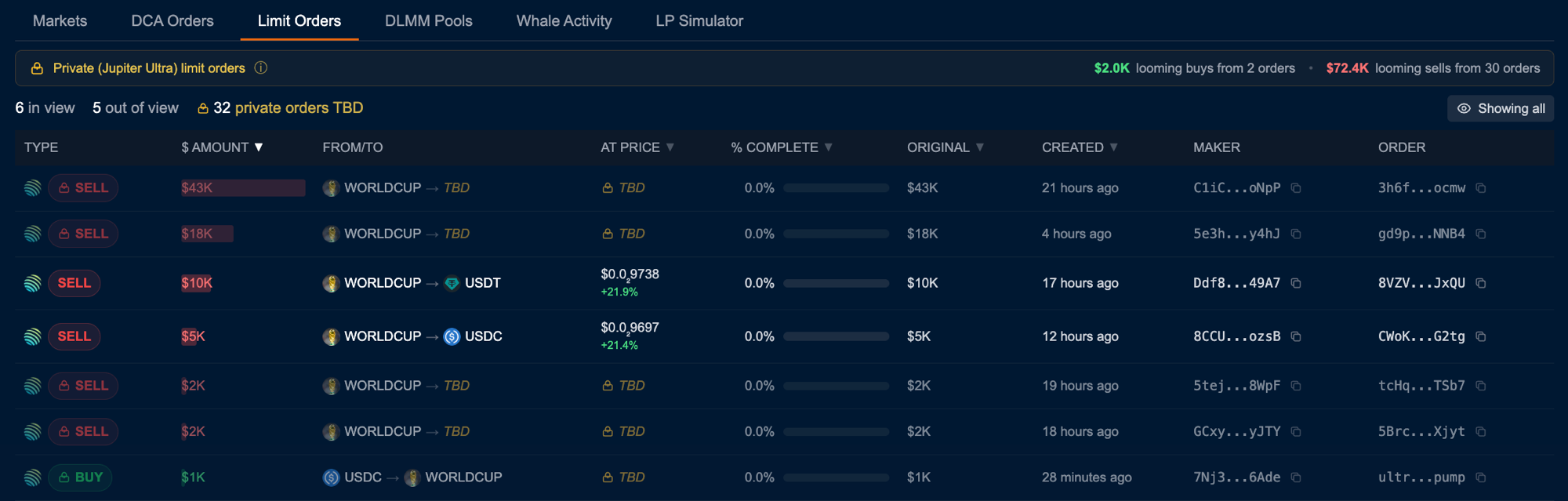
On any token's Limit Orders tab, private orders appear with:
- A padlock badge next to the BUY/SELL pill so you can tell them apart from regular limit orders at a glance
- TBD in the price column and (for sells) in the destination side of the From/To column
- A roll-up banner at the top of the tab aggregating the total looming buy and sell dollars across all private orders for that token
- A dimmed row treatment, similar to out-of-view orders, to visually distinguish them from priced orders you can position on the chart
- An "In view only" toggle that hides them, useful when you only want to study orders with a known trigger price
Why this matters for trading
- Hidden walls become visible. A $50K private sell order is still $50K of incoming sell pressure. Even without a price, knowing it exists changes your read on a chart.
- Roll-up totals signal smart-money positioning. When private orders cluster heavily on one side of a token, it hints that traders who care about not telegraphing their hand are positioning there.
- Partial fills reveal the level. Once a partial fill happens, you'll see the price snap into place and the order joins the support or resistance bars on the chart.
- The chart catches up the moment a fill lands. Until then, private orders are tracked in the roll-up only, not in the support and resistance bars on the chart. We won't guess at a price level we can't verify. Toggle "In view only" to hide private rows when you want to focus on orders that are already pinned to specific price levels.
Quick reference
- Padlock badge? Private (Jupiter Ultra) order: price not yet disclosed.
- TBD price? We're waiting on a partial fill to reveal the trigger. Until then the dollar amount is shown in the Limit Orders roll-up only, not on the support / resistance bars on the chart.
- "→ TBD" on a sell? The trader hasn't committed on-chain to a specific output token. Most route through USDC or SOL, but until the fill we can't say which.
- Order address links to a transaction (not a wallet) because private orders are identified by their setup tx signature, not a dedicated order account.