Token Screener
Filter the token universe by the data that actually predicts moves: liquidity, organic volume, fee density, and whale accumulation.
Table of Contents
What the screener is
The screener at clobr.io/tokens ranks the token universe by CLOBr Score and lets you cut it by the dimensions other screeners do not have: support liquidity, organic (wash-filtered) volume, LP fee density, and whale accumulation. Most screeners rank by price change and raw volume, both of which are cheap to fake. Every column here is built from on-chain liquidity and filtered order flow.
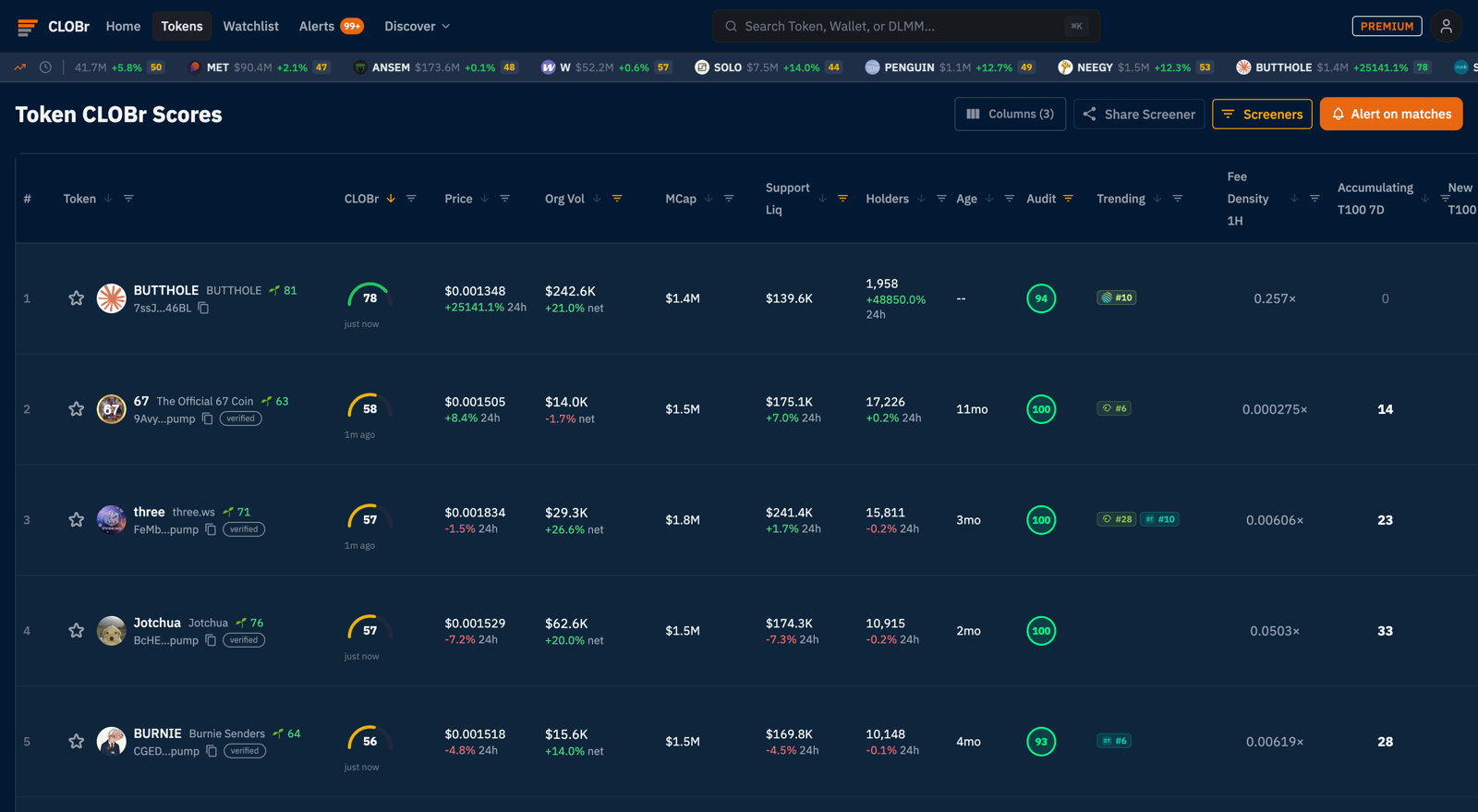
Columns and the column selector
The Columns button (top right) controls which dimensions are visible. The defaults:
| Column | What it tells you |
|---|---|
| CLOBr Score | 0-100 balance of buy-side vs sell-side pressure from aggregated liquidity and order flow. Above ~53 leans bullish, below ~47 means sellers hold the levels. See Token Detail Pages. |
| Org Vol | Organic volume: buy + sell volume with wash trading filtered out, with its 24h net direction. A token doing $240K organic on a $1.4M market cap is genuinely being traded; a token doing $5M raw volume from three wallets is not. |
| Support Liq | Dollar value of real bid-side liquidity within ±25% of the current price, aggregated across every pool and order type CLOBr tracks. This is the number that answers "if I need to exit now, what catches the sell?" Liquidity parked far from price is excluded, because it will not catch anything today. |
| Audit | 0-100 contract-safety score (mint authority, freeze authority, holder concentration). See Audit Score Calculation. |
| Trending | Live rank chips from external trending boards, so you can see which tokens the wider market is looking at right now. |
| Fee Density (1H/6H/24H) | Organic volume divided by concentrated liquidity near price. The LP-first column: 2x in 1H means each pooled dollar near price turned over twice that hour. Full method in LP Fee Cheat Sheet. |
| Whale columns | Accumulating and New wallet counts among top holders. Covered below. |
Plus the basics: price with 24h change, market cap, holders with 24h change, and token age. Every column header sorts; click again to flip direction.
Filters, one by one
Every filter lives behind the Filters button above the table. The button carries a count of what you have changed, and each one you set shows up next to it as a chip you can remove on its own. Numeric filters take a custom range or one-click presets:
- Chain: all chains, Solana only, or Robinhood Chain only. A chain here means the token trades there, not that it was born there, so an asset with pools on both appears under either.
- Asset type: All, RWA only, or Hide RWA. RWA covers tokenized stocks, ETFs, commodities and other real-world assets. Use RWA only to screen the tokenized-equity book on its own, and Hide RWA to keep them out of a memecoin hunt.
- Organic score: presets at >1, >30 and >60. Jupiter's score on Solana, CLOBr's own on Robinhood Chain.
- Venue (under Trending): All, Jupiter, GeckoTerminal, Solana Tracker or pump.fun. Picking one narrows the list to that venue's trending feed and sorts it #1 first in the same click. The same section holds the combinations a single venue cannot express: trending anywhere, several named platforms at once, and a minimum platform count. There is also a one-click sort by blended trending score.
- CLOBr Score: presets at >65, >75, >85. Start at >65; raise it when the market runs hot and everything scores high.
- 24h Price Change: both directions, from <-50% (knife-catching candidates) to >+100% (momentum).
- Organic Volume: >$10K / >$100K / >$300K. The single best fake-token filter on the page.
- Market Cap: >$100K / >$1M / >$10M.
- Support Liquidity: >$50K / >$250K / >$1M. Filters out tokens where any exit is a cliff dive.
- Holders and Age: >500 holders and >7d age together remove most of the launch-day casino.
- Audit: minimum contract-safety score.
- Trending: only tokens currently on trending boards, when you want to trade attention.
- Fee Density: by window (1h, 6h, 24h) and by denominator (traveled range or fixed band). Presets from >0.5x to >2x turnover.
- Tags & Organic Score: verified tokens and Jupiter organic score thresholds.
Filters stack. The row count updates live, so you can watch a 200+ token universe collapse to the six worth your attention.
Whale activity columns
The whale filter adds columns built from top-holder wallet tracking. Each column is a combination of three choices:
- Metric: Accumulating (existing top holders adding to their position) or New (brand-new wallets entering the top-holder set).
- Tier: top 20, top 50, or top 100 holders.
- Window: 1 day, 7 days, or 30 days.
"Accumulating T100 7D = 14" reads as: 14 of the top 100 holders added to their position in the last 7 days. Accumulation while price is flat is the classic quiet-bid pattern. The same data drills down per token on the Whale Activity tab.
Saved screeners and sharing
The Screeners button saves your current filter + column combination under a name, so a setup you trust ("Score >65, Org Vol >$100K, Accumulating T100 7D >5") is one click on every visit, not five minutes of re-configuration.
Share Screener generates a link that reproduces your exact view for anyone who opens it. If you publish setups on X or in a trading group, share the screener instead of a screenshot; the recipient gets a live view, not a stale image.
Alert on matches
Alert on matches turns the current filter set into a standing alert: CLOBr notifies you when a new token enters your filtered universe. Build the screen once and it scouts around the clock. Delivery channels and limits are covered in CLOBr Alerts.
Three workflows, novice to expert
Novice: the safety screen
Filter Audit >90, Support Liquidity >$50K, Age >7d, Holders >500. Sort by CLOBr Score. This removes most rugs and launch-day traps before you ever open a chart. Click through to the token page and read the depth chart before acting.
Intermediate: the momentum-with-floor screen
Filter CLOBr Score >65, Organic Volume >$100K, 24h Change >+10%. You are looking for tokens moving up on real volume while buy-side liquidity still outweighs sell walls. Save it, then add Alert on matches so new entrants ping you.
Expert: the quiet-accumulation screen
Filter 24h Change between -10% and +10%, Accumulating T100 7D >5, Fee Density 24H >0.5x. Flat price, whales adding, pooled dollars turning over: the setup before the setup. Confirm on the token page with the DCA Orders and Whale Activity tabs before sizing in.
Quick reference
- Columns button: choose visible dimensions
- Funnel icon on any header: filter that dimension
- Screeners button: save and reload filter sets
- Share Screener: live link to your exact view
- Alert on matches: standing alert for new tokens entering your screen